Free features includedMore features with the plugin pack
Compare CSV and app values
without writing records
Match a local CSV to app records by key. Review added, removed and changed values, then save the differences as CSV.
Download ZIP Pricing and purchaseDesktop list screens. Compares all accessible records, ignoring list filters.
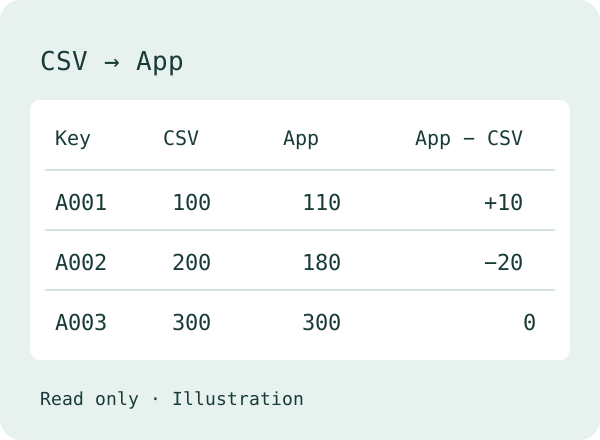
Left: CSV. Right: app. Difference: app − CSV.
Added means app only; removed means CSV only. Neither side is assumed correct. No records are changed.
Check the key first
Confirm the first five rows and column mapping before running. Empty or duplicate normalized keys, and no matching keys, stop the comparison.
Stop on encoding errors or incomplete data
Choose UTF-8 or Shift_JIS explicitly. Suspected corrupted text, exceeded record limits and cancellation produce no partial results.
Compare free and pack features
Paid features are included in the plugin pack: 29,800 JPY per year, tax included. This plugin is not sold separately. Valid for 365 days with no automatic renewal.
Try paid features for 30 days from the first save enabling paid comparisons. Free-only settings do not start the trial. No card required.
Free and pack features use the same ZIP. Already own the pack? Enter its key in settings without buying again.
| Feature | Free | Plugin pack |
|---|---|---|
| Keys and text columns | One key, one column | One key, multiple columns |
| Amount differences and date normalization | Unavailable | Available |
| Export all differences as CSV | Available | Available |
| Duplicate and encoding protection | Available | Available |
Each app and plugin starts its own trial when you first save settings enabling paid comparisons. Free-only settings do not start the trial.About the plugin pack
After the trial, or after the annual license and its 14-day grace period end, amount differences, date normalization and multiple columns stop. Select one text column to continue comparing and exporting for free. Saved license keys are retained.
Install and test
v0.1.1 · 29989 bytes. Download the signed ZIP.
- Import the ZIP through Kintone Administration → Plug-ins → Import. Keep it zipped.
- Add the plugin to your app and save its settings. Enter your pack key if you have one.
- Click Update App, then open a desktop list screen.
- Choose a fictional CSV, map its key and comparison columns, check the preview and run.
Before you use it
Which records are compared?
All records you can view, ignoring list filters. Fields you cannot view cannot be retrieved.
What are the limits?
CSV: 10 MiB, 50,000 rows and 200 columns. Retrieve up to 50,000 app records (default 10,000), 500 at a time. Cancellation discards partial results.
Is data sent or updated?
CSV and results stay in browser memory. No external service receives them. Only GET requests inside Kintone are used; no records are updated.
How do dates and amounts work?
Use them with the pack or during the trial. Amounts allow up to two decimals. Signed differences always mean app − CSV.
What is unsupported?
Mobile, table fields, attachments and multi-select fields are unsupported. This is not a snapshot against concurrent edits. Test in a copy of your app first.
Languages, license and terms
Compare CSV data locally with accessible app records. Check encoding, key mapping and comparison direction before running.
Japanese and English use the same ZIP and the same license key. There is no separate English purchase. The plugin’s screens follow each user’s Kintone language setting: Japanese when set to Japanese, English for every other language.
You need a Kintone plan that supports plugins. To import the ZIP, you need Kintone Administrator rights. To add and configure it in an app, you need app administration rights. Import the ZIP through Kintone Administration → Plug-ins → Import. Keep it zipped. Add the plugin to your app, save its settings and click “Update App”. To update, import the newer ZIP through the same screen. Updates are manual.
Your license key appears on a page after payment; it is not sent by email. Save that page’s URL to find your key again. You can also find a saved key in the plugin settings. If you lose both, contact us with the product name and the number on your receipt or invoice; do not buy again. Paste the key into the plugin settings for each app, save and update the app. One key covers one Kintone environment (subdomain), with no limit on apps or users. Renew from the plugin settings when needed. No automatic renewal or automatic charges. Paid features have a 14-day grace period after the annual license expires. There is no grace period after a trial ends. This plugin is not sold separately.
Use a Kintone plan that supports plugins. Check the features and permissions described above in a test app in your environment before production use.
The plugin sends no data outside your Kintone environment.
Terms of use (Japanese) · Privacy policy (Japanese) · Seller information and refund terms (Japanese) · Contact form (Japanese)
Contact Tsugite Labs
The contact form page is in Japanese. You can write your message in English. For a problem report, include the screen, plugin settings, field types, fictional example values and any error message. Do not send customer data or real record contents.
Contact form (Japanese)